
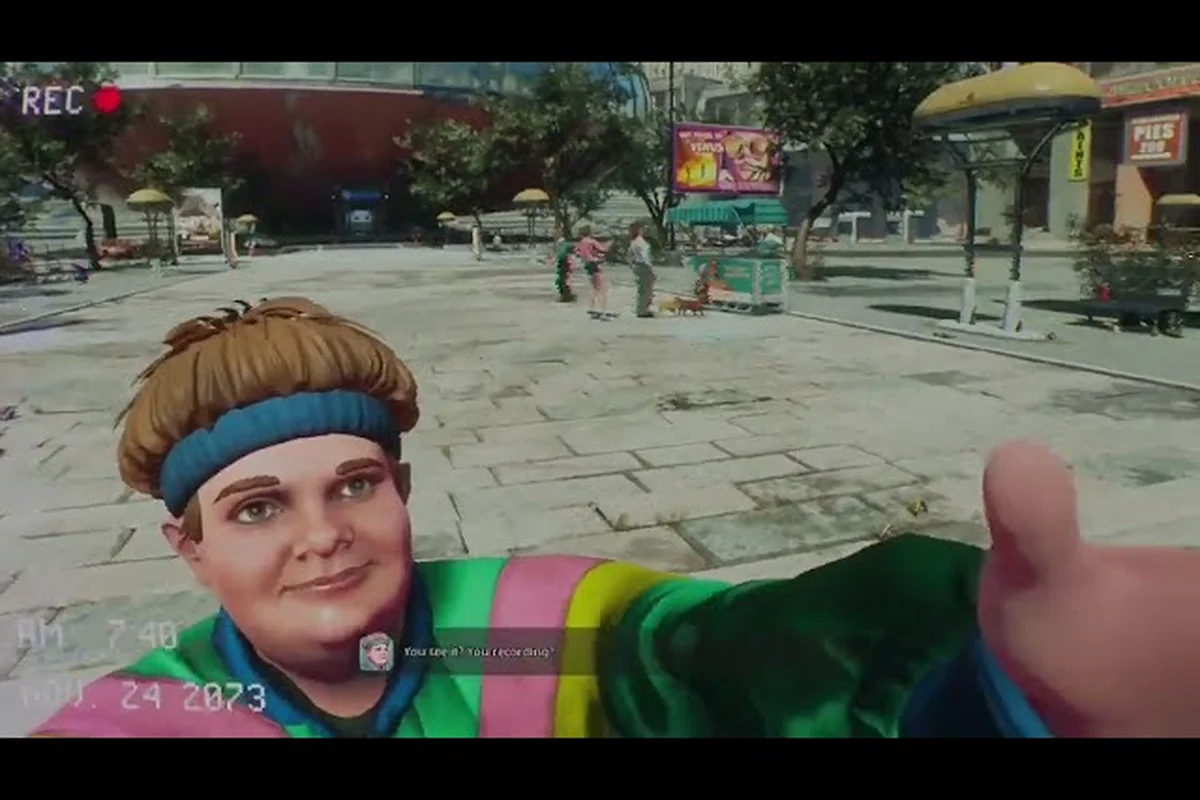
Space is unforgiving, but your vessel does not have to be. Breathedge 2 ship customization lets you reshape your personal spacecraft from a duct-taped coffin into a functional mobile base that matches how you actually play. Whether you favor fast recon runs or heavy cargo hauls, the modules you bolt onto your hull determine survival, speed, and salvage efficiency from the first hour to the late game.
The Core Philosophy of Ship Customization
RedRuins Softworks has built Breathedge 2 around modular survival systems, and your personal spacecraft is the central hub of that loop. Unlike the cramped escape pod from the first game, Breathedge 2 gives you a compartment-based hull where every section you attach changes weight, power draw, and interior capacity. According to the official Breathedge 2 Steam page, the full version will keep expanding transportation forms, including small flying and ground vehicles plus a personal spacecraft that grows over time.
This means ship customization is not cosmetic in the traditional sense. Every module you add pulls from your total power budget, and every extra compartment increases your hull's mass. Players who bolt on too many storage racks early will find their acceleration sluggish and their fuel burn rate punishing. The key is understanding which compartments give you survivability first and efficiency second.
Early Game Customization Priorities
The first spacecraft compartment modules you unlock are deliberately simple. You will have access to basic life support, a small storage bin, and a navigation relay. The temptation is to hoard salvage and stack storage, but experienced community reports suggest focusing on power generation and hull integrity before cargo capacity.
-
Power Cell Array: Increases total energy available for life support and thrusters
-
Hull Plating: Reduces collision damage and environmental hazard bleed
-
Basic Storage Rack: Adds carry weight but increases mass significantly
-
Navigation Relay: Unlocks route plotting and zone markers on the map
A common early mistake is treating the ship like a static base. In Breathedge 2, your personal spacecraft moves with you, which means its mass affects every trip. Keeping the hull lean during the first chapter lets you escape Coffinbot patrols without burning your entire oxygen reserve.
Personal Spacecraft vs. Ground and Flying Vehicles
One of the most important distinctions in Breathedge 2 is the split between your personal spacecraft and the smaller vehicles you will pilot during planetary excursions. The spacecraft serves as your mobile base, while ground and flying vehicles are short-range tools for surface exploration. The official developer notes confirm that different transportation forms are planned for the full release, which means you should not expect your spacecraft to land and drive on a planet surface.
The table below breaks down how each vehicle type functions in the current Early Access build based on community testing as of 2026. Personal spacecraft like the Space Golf Cart accept the most ship customization modules — engine, hull plating, and interior decor — while ground vehicles such as the Crawler ATV prioritize terrain handling and storage over cosmetic slots, and flying vehicles like the Recon Drone trade armor for speed and sensor range. Understanding these differences matters because module slots are not interchangeable across vehicle classes, so a hull upgrade crafted for your personal spacecraft will not slot into a ground or flying vehicle.
| Vehicle Type | Role | Customization Depth | Fuel Source | Risk Level |
|---|---|---|---|---|
| Personal Spacecraft | Mobile base, long-range travel | High: compartments, modules, hull upgrades | Main reactor + reserve cells | Moderate |
| Flying Vehicle | Short-range aerial recon, quick escape | Low: speed and fuel tweaks | Portable fuel cells | High |
| Ground Vehicle | Surface traversal, cargo hauling on planets | Medium: storage and durability | Battery packs | High |
| Afterburner Sled | Fast travel between nearby zones | None: fixed function | Oxygen canisters | Low |
The split matters because it changes how you spend resources. Upgrading your personal spacecraft's Warp Jump drive is a long-term investment, while buying a better ground vehicle might only matter for one planetary chapter. Players who understand this early avoid sinking rare materials into short-lived surface rides.
How to Drive Vehicles
Learning how to drive vehicles in Breathedge 2 is less about memorizing controls and more about managing momentum. Ground vehicles handle with a slight delay because their wheels or treads have traction limits on loose regolith. Flying vehicles require constant thrust correction, especially in low gravity where overshooting a landing zone is common.
The control scheme is consistent across vehicle types: throttle on the trigger, directional input on the stick or keys, and a dedicated button for boost or lift. The difference is how each vehicle responds. Ground vehicles reward slow, deliberate turns because sharp steering at speed will flip lighter models. Flying vehicles punish overcorrection because inertia carries you far past your intended stop point.
If you are new to piloting, practice in open zones before attempting narrow canyon routes or debris fields. Community reports indicate that most vehicle losses happen within the first ten minutes of a new surface excursion, usually because players treat a loaded ground vehicle like a sports car.
Module Layout and Power Budgeting
Breathedge 2 ship customization is ultimately a puzzle about power draw versus utility. Every compartment you attach to your personal spacecraft draws from the main reactor, and if your total draw exceeds generation, you will experience system brownouts. Brownouts disable non-essential systems first, which usually means your lights and scanners drop while life support barely holds.
The table below shows a typical mid-game power budget based on player reports and Early Access testing, but the numbers shift dramatically once you mount a second Drill Module or start running the Electromagnetic Pulse Turret on your personal spacecraft. For example, a standard mid-game hull with one Reinforced Cargo Container, a Medium Oxygen Garden, and a single Ion Thruster array usually draws around 340–380 kW, leaving roughly 20–25% headroom before the reactor's overheat threshold kicks in. Early Access testers on the Breathedge 2 subreddit consistently report that upgrading to the Triton-class Generator early—before adding cosmetic lighting strips or a Coffee Machine module—prevents brownouts during high-draw maneuvers like boosting through debris fields while the Scanner Pulse is active.
| Module | Power Draw | Mass Impact | Utility Value | Recommended Priority |
|---|---|---|---|---|
| Reinforced Hull | 0 | High | Damage resistance | 1st |
| Oxygen Recycler | 15 | Medium | Extends survival time | 2nd |
| Cargo Bay Extension | 5 | High | More salvage capacity | 3rd |
| Shield Emitter | 30 | Low | Absorbs incoming damage | 4th |
| Warp Drive | 45 | Medium | Enables long-range jumps | 5th |
The Shield Emitter is a trap for new players because it draws a huge amount of power while offering protection only during combat. If you are not actively fighting Coffinbot swarms, that power is wasted. Veterans recommend installing the Oxygen Recycler first because it pays off constantly during long salvage runs, not just in emergencies.
Compartment Synergy Effects
Certain module combinations trigger passive bonuses that are not listed in the basic stats. For example, pairing a Navigation Relay with a Cargo Bay Extension improves route efficiency because the relay can calculate optimal trajectories based on your loaded mass. Similarly, an Oxygen Recycler paired with a Shield Emitter reduces the emitter's power draw by 10 percent because the recycled atmosphere cools the shield capacitors.
These synergies are not fully documented in the current Early Access build, so community testing remains the primary source for discovering them. The developers have stated that the full release will include more items, equipment, and ways to interact with the world, which likely means additional synergy pairs for the personal spacecraft.
Vehicle List and Acquisition Routes
The Breathedge 2 vehicles list is still growing as the game moves through Early Access. Currently, players have confirmed several distinct vehicle types through gameplay and official trailers. The official Early Access trailer shows spaceship and vehicle shots that match what players encounter in the first story chapter.
The table below summarizes the confirmed vehicle types and where you can expect to find or unlock them. Each entry is tied to the ship customization loop: space vehicles such as the starter shuttle and mid-game transport are typically granted through main quest progression, while ground vehicles — including the rover and cargo hauler — are unlocked by scanning wreckage nodes and spending research points at the engineering station. Flying vehicles sit in between, often requiring a salvaged propulsion module plus a hull upgrade before they appear in the fabrication menu. If a row lists "blueprint drop," expect to loot the schematic from a derelict cockpit or supply cache rather than buying it from a vendor.
| Vehicle | Acquisition | Primary Use | Customization | Fuel Type |
|---|---|---|---|---|
| Personal Spacecraft | Story unlock, Chapter 1 | Mobile base, long-range travel | Compartments and modules | Reactor |
| Scout Skiff | Crafted after first surface trip | Short aerial recon | Speed and fuel only | Fuel cells |
| Cargo Rover | Blueprint from side quest | Ground cargo hauling | Storage and durability | Battery |
| Afterburner Sled | Crafted early, low cost | Fast travel between zones | None | Oxygen |
The Scout Skiff is the first flying vehicle most players obtain, and it serves as an introduction to aerial handling. The Cargo Rover is the workhorse for planetary resource runs, but it handles like a brick in low gravity. The Afterburner Sled is technically not a vehicle in the traditional sense, but it functions as a quick transit tool when you need to cross short distances without dragging your whole spacecraft.
Space Vehicles and Long-Range Planning
Space vehicles in Breathedge 2 fill the gap between your personal spacecraft and surface-based rides. These are typically small, single-occupant craft designed for tasks like asteroid mining, derelict boarding, and emergency escape. They are not customizable in the same way as your main spacecraft, but they do benefit from the same fuel and repair systems.
Understanding the distinction between your personal spacecraft and auxiliary space vehicles is critical for resource planning. Your spacecraft is the one you invest in heavily because it persists across chapters. Auxiliary space vehicles are often mission-specific, and the resources you spend on them may not carry forward. Players who treat every vehicle as a long-term asset end up with a hangar full of half-upgraded junk and no reactor fuel.
The Breathedge 2 survival guide covers oxygen management and early resource priorities that directly feed into your ship customization decisions. A lean spacecraft with a strong oxygen recycler will keep you alive far longer than a heavily armored hull with no life support redundancy.
Customization Roadmap by Chapter
Your Breathedge 2 ship customization options expand as you progress through the story, and each chapter introduces a new layer of complexity. The early game is about survival basics, while later chapters push you toward specialization. The roadmap below reflects the current Early Access state as of August 2026 and may shift with future updates.
| Chapter | New Customization Layer | Key Modules | Primary Challenge |
|---|---|---|---|
| Chapter 1 | Basic compartments | Power cells, hull plating, storage | Power and oxygen management |
| Chapter 2 | Vehicle access | Scout Skiff, Cargo Rover | Surface traversal |
| Chapter 3 | Advanced modules | Shield emitter, oxygen recycler | Combat and hazard zones |
| Chapter 4+ | Warp systems | Warp drive, navigation relay | Long-range route planning |
The jump from Chapter 2 to Chapter 3 is where most players hit a customization wall. The Shield Emitter and Oxygen Recycler require rare materials that only spawn in hazardous zones, which means you need a partially upgraded spacecraft to reach the materials you need for further upgrades. This loop is intentional and forces you to make trade-offs between safety and speed.
Choosing a Customization Playstyle
Your personal spacecraft should reflect how you actually play, not how a generic guide tells you to build. Three broad playstyles have emerged from community discussions, each with a different customization priority. Scavenger-focused players prioritize expanded cargo holds and reinforced hull plating to survive debris fields while hauling salvage back to the station, whereas combat-oriented pilots dump early resources into thruster overdrive modules and weapon hardpoints—sacrificing storage for the agility needed to outmaneuver hostile encounters in the vacuum corridors. Exploration-focused builders, by contrast, route power toward long-range scanner arrays and efficient oxygen recyclers, extending time away from the docking bay at the cost of raw speed.
-
Scavenger: Maximize cargo capacity and oxygen recycling, accept lower hull integrity, avoid combat whenever possible
-
Combat Pilot: Prioritize shield emitters and reinforced plating, accept higher power draw and fuel consumption
-
Explorer: Balance navigation relay with warp drive efficiency, focus on route planning and fuel economy
None of these playstyles is objectively better, but mixing priorities without a clear plan leads to a spacecraft that is mediocre at everything. The Scavenger build is the most popular for Early Access because the current content rewards resource hoarding, but the Explorer build may become stronger as the developers add new star systems and zones.
Maintaining Your Customized Vessel
Customization is not a one-time event. Your personal spacecraft degrades as you fly through debris fields, absorb laser fire, and make rough landings. The ship repair guide covers maintenance routines and system diagnostics, but the core principle is simple: every module you add creates a new failure point.
A heavily customized spacecraft with twelve compartments will require more repair materials than a lean four-compartment build. This is the hidden cost of customization that many players overlook. The Oxygen Recycler and Shield Emitter are particularly maintenance-hungry because they run constantly during flight. If you install both, stockpile the repair materials they consume or you will find yourself stranded with a dead recycler and no spare parts.
The ship management guide goes deeper into power routing and compartment optimization, but the key takeaway is that customization and maintenance are two sides of the same coin. Every upgrade is a commitment to ongoing resource costs, not a permanent fix.
Frequently Asked Questions
Does Breathedge 2 ship customization affect gameplay beyond cosmetics?
Yes, every customization choice changes performance metrics like mass, power draw, fuel consumption, and durability. A heavily armored hull will protect you in combat but slow your acceleration and increase fuel burn. Customization is a functional system, not a visual one.
Can I drive ground vehicles and fly spacecraft with the same controls?
The control scheme is consistent across vehicle types, with throttle, steering, and boost on similar inputs. However, each vehicle responds differently to those inputs. Ground vehicles reward slow turns, while flying vehicles require constant thrust correction to avoid overshooting your landing zone.
Where do I find new customization modules for my personal spacecraft?
Modules are acquired through story progression, side quest blueprints, and salvage from derelict ships. Some rare modules only spawn in hazardous zones, which forces you to partially upgrade your spacecraft before you can reach the materials needed for further upgrades.
Is the personal spacecraft the only vehicle I can customize?
No. Ground vehicles like the Cargo Rover have limited customization for storage and durability, while flying vehicles like the Scout Skiff allow speed and fuel tweaks. However, your personal spacecraft has the deepest customization system and is the only vehicle that persists across all chapters.
Does the customization system change in the full release?
According to the official Steam page, the developers plan to add more items, equipment, and ways to interact with the world during Early Access. New vehicle types and customization options are likely, but the current compartment-based system for the personal spacecraft is expected to remain the core framework.